Practicing harmonies: a harmony part made from the vocals
Singing a harmony is hard mainly because the melody pulls you onto it. Band Stem Mixer can make a harmony part from the vocals of a song: it finds the chords, follows the melody, and adds the harmony as two extra parts in the mixer — the singer's own voice moved to the harmony notes, and a plain guide tone. You can then turn each one up or down while you learn.
Making the harmony
- Separate the song into four parts (see how to use).
- Choose the part next to the button: upper (a 3rd above), lower (a 3rd below), or a 5th above or below.
- Press “Find chords & make harmony”. It takes from a few seconds to about a minute, depending on the song and the device. Playback goes on while it works.
Everything is worked out in your browser, without the AI model or any download. After the first time the button becomes “Remake the harmony”: it reuses the chords and the melody it already found, so it is quicker. Use it after you change the part or the chords: the button turns black when the harmony no longer matches them.
Reading the screen
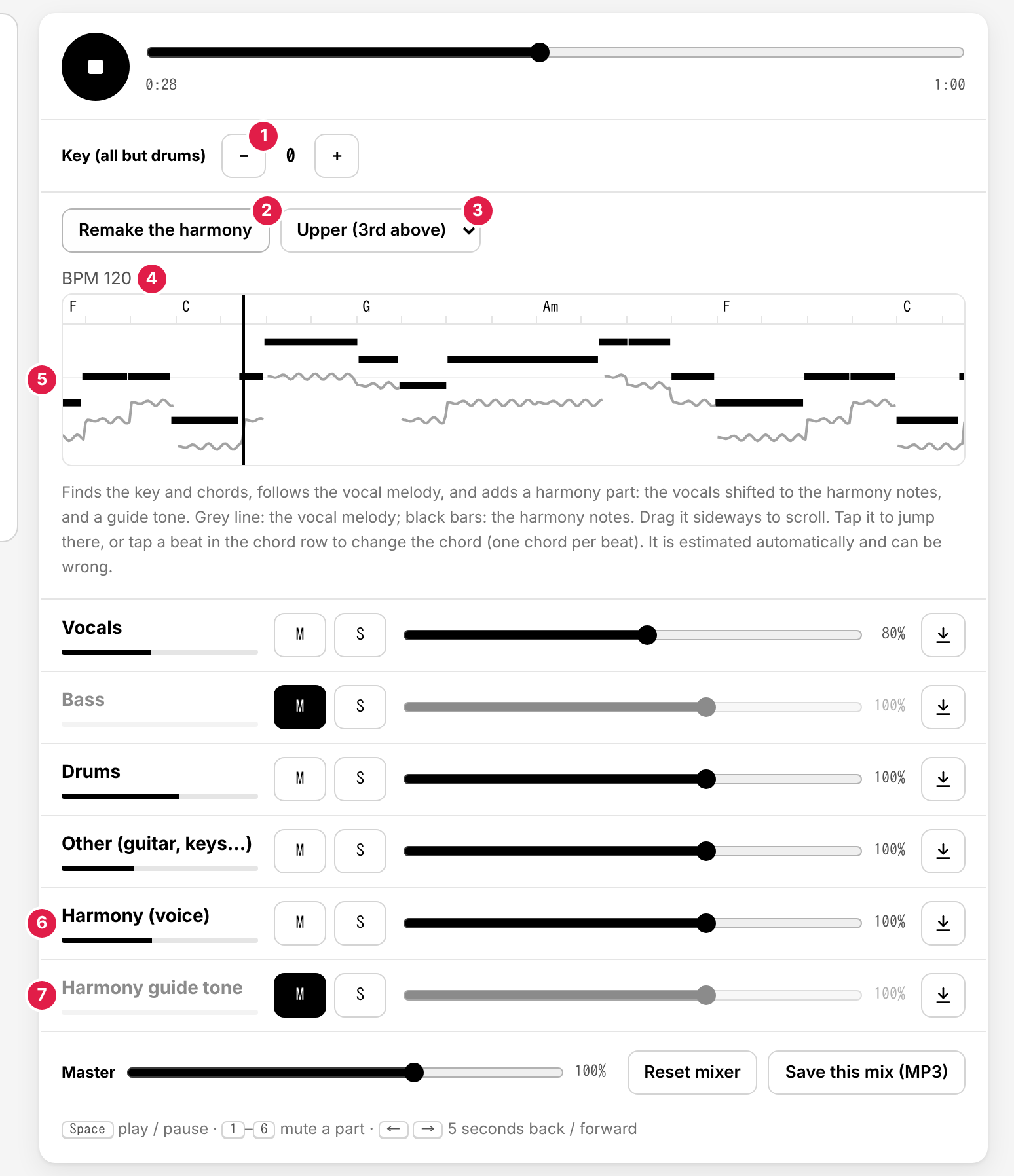
- Key – Moves every part except the drums, and the harmony with them, by semitones. See chords and key change.
- Find chords & make harmony / Remake the harmony
- The harmony part – 3rd or 5th, above or below.
- BPM – The tempo found in the song. The chords change on its beats.
- The roll – The chord names on top, with a small tick at every beat; the vocal melody as a grey line; the harmony notes as black bars; the black vertical line is the play position. Drag it sideways (or use a sideways swipe or Shift + wheel) to look ahead or back; tap it to jump there. It follows the playback again when you press play.
- Harmony (voice) – The separated vocals moved to the harmony notes. It keeps the singer's vibrato and words, so it sounds like a second singer.
- Harmony guide tone – The same notes as a plain, steady tone. The pitch is exact, which makes it the easiest to sing along to. It starts muted; press its M to hear it.
Both new parts have M, S, a fader, and the ↓ button to save them as MP3 files, like the other parts.
Upper or lower, 3rd or 5th
| Part | What it sounds like | Good for |
|---|---|---|
| Upper (3rd above) | The most common harmony in pop: bright, moving with the melody | Singers whose range goes higher than the lead |
| Lower (3rd below) | Warm and supporting, under the melody | Lower voices; a softer harmony |
| 5th above / below | Open and strong, more “hollow” than a 3rd | Rock choruses, power-chord songs; a third voice next to a 3rd harmony |
The app does not simply add a fixed interval. For each note it picks a note in the song's key, and when that note would clash with the chord at that moment, it moves to a chord tone instead — so a “3rd above” is sometimes a 4th, and a “5th” sometimes a 6th, as a singer would do. Short gaps between notes are joined, so the harmony moves smoothly through a phrase instead of stopping and starting.
A practice plan in four steps
- Listen. Solo the guide tone (S) and listen to the harmony on its own a few times. Then add the vocals (S on both) to hear how the two lines fit.
- Sing with the guide. Turn the guide tone on (its M; it starts muted) and keep the vocals on, and sing the harmony along with the guide. Turn the harmony voice off (M) for now.
- Lower the help. Turn the guide tone down step by step — 60%, 30% — until you are carrying the harmony yourself against the lead vocal.
- Sing it alone. Mute the guide tone and the harmony voice and sing the harmony against the lead and the band. To check yourself, unmute the harmony voice for a moment.
Want to sing the melody against a harmony instead? Mute the vocals and keep the harmony voice on. To fit your range, move the key (−/+); the harmony follows.
Save what you made with ↓ or “Save this mix (MP3)” to practice on your phone. The harmony is not kept in the app after you reload.
When a chord is wrong: edit it and remake
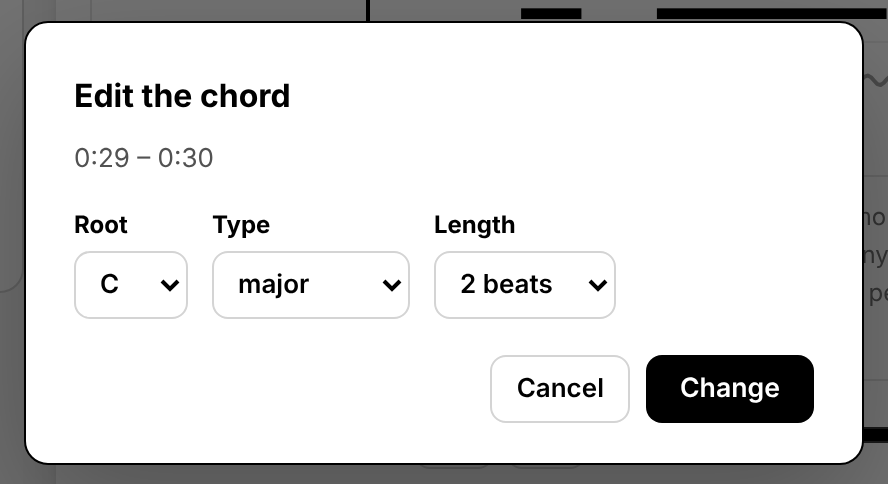
The harmony is chosen to fit the chords, so a wrong chord can give a wrong harmony note. Tap the beat in the chord row (the top of the roll) where the chord is wrong, choose the root, the type, and how many beats it lasts, and press “Change”. Then press “Remake the harmony”. Details are in editing the chords.
What to expect
- It is an estimate. The chords, the melody, and the choice of harmony notes are worked out automatically and can be wrong, especially with backing vocals in the vocal part, fast runs, or songs with unusual chords.
- One key for the whole song. A song that changes key partway (for example a last chorus a step up) is harmonized in one key, so notes after the change can be off.
- The harmony voice is processed sound. Moving a voice a 3rd or more changes its character a little, and anything that leaked into the vocal part moves with it. For an exact pitch, use the guide tone.
- A harmony is a suggestion, not the record. If the song has its own harmony part, learn that one by ear; the app's harmony is a starting point or a practice tool.
Use songs you have the rights to use; see which songs you can use.